

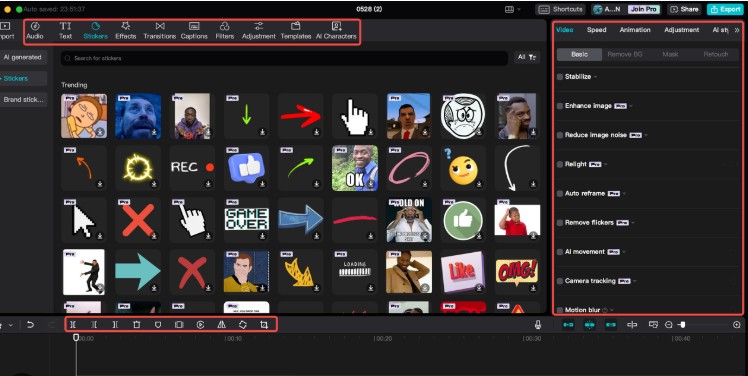
Owned by ByteDance, CapCut remains the most dominant free editor in 2026. It isn’t just for TikTok anymore; the desktop version has become a legitimate rival to professional software.
-
Key AI Features:
-
Auto-Captions 3.0: Instant, stylish subtitles in over 20 languages with nearly 99% accuracy.
-
AI Background Removal: Removes backgrounds from complex footage without a green screen.
-
AI Eye Contact: Digitally adjusts your eyes so you appear to be looking at the camera even if you were reading a script.
-
-
The “Free” Reality: It is mostly free with no watermark on standard exports. Some “Pro” effects require a small subscription, but the core AI tools are accessible to everyone.
2. DaVinci Resolve 19: The Professional’s Choice
If you want Hollywood-level quality for $0, DaVinci Resolve is the only answer. While the “Studio” version costs money, the free version is more powerful than most paid competitors.
-
Key AI Features:
-
Magic Mask: Allows you to “paint” over an object or person to track and isolate them instantly for color grading or effects.
-
Smart Reframe: Automatically identifies the action in a widescreen video and crops it for vertical formats (TikTok/Shorts).
-
Voice Isolation: Uses neural networks to remove 100% of background noise from a recording, leaving only crisp “Studio” quality vocals.
-
-
Best For: Long-form YouTube content and cinematic projects.
3. OpusClip: The Viral Repurposing Engine
In 2026, nobody manually cuts long videos into shorts. They use OpusClip.
-
How it works: You drop a link to a long YouTube video, and the AI analyzes the “hook,” the “flow,” and the “virality potential.” It then automatically cuts the video into 10-15 short-form clips.
-
The “Free” Reality: The free tier gives you a set amount of “AI Credits” every month. It’s perfect for creators testing the waters of short-form content.
-
External Link: Check out the latest OpusClip Features to see how their “Virality Score” works.
4. Invideo AI: The “Prompt-to-Video” Co-Pilot
If you have a script but no footage, Invideo AI is your best friend. In 2026, its “Video Co-pilot” allows you to edit by simply chatting.
-
Key AI Features:
-
Natural Language Editing: You can type “Make the music more upbeat” or “Replace the scene of the forest with a futuristic city,” and the AI executes the edit.
-
Auto-Stock Integration: It automatically pulls high-quality B-roll from libraries like Storyblocks and Shutterstock to match your script.
-
-
External Link: Explore their Free Generation Plan which currently offers 10 minutes of AI video generation per week.
2026 AI Feature Comparison Table
| Tool | Best For | Watermark? | Key AI Highlight |
| CapCut | Social Media | No (Standard) | Eye Contact & Auto-Captions |
| DaVinci Resolve | Pro Filmmaking | No | Magic Mask & Neural Audio |
| OpusClip | Shorts/TikToks | Yes (Free Tier) | Viral Clip Detection |
| Invideo AI | Explainer Videos | Yes (Free Tier) | Prompt-to-Video Generation |
| Descript | Podcasts | Yes (Free Tier) | Script-Based Editing |
The Secret Sauce: Combining Tools
The pro-level “hack” in 2026 is Tool-Stacking. Most creators don’t use just one tool; they use a workflow:
-
Step 1: Use Invideo AI to generate a rough cut from a script.
-
Step 2: Bring that footage into CapCut to add trendy effects and AI-stabilization.
-
Step 3: Use DaVinci Resolve for final color grading and high-end audio cleanup.
Frequently Asked Questions (FAQs)
Q1: Do free AI tools lower the quality of my video?
Not necessarily. Most tools like CapCut and DaVinci Resolve allow for 4K exports even on free tiers. However, some web-based tools might limit you to 720p or 1080p unless you upgrade.
Q2: Is AI video editing “cheating”?
In 2026, AI is seen as a Utility, not a replacement for creativity. Think of it like a “Calculator” for math. It doesn’t tell the story for you; it just removes the friction of building it.
Q3: Can I remove watermarks for free?
On CapCut, you can remove the end-frame watermark for free. On tools like OpusClip, you usually have to pay or use “referral credits” to remove the watermark. Check Runway ML for cinematic tools that sometimes offer watermark-free trials.
Q4: Which tool is best for AI Voiceovers?
ElevenLabs (integrated into many editors) is the gold standard for voice. However, CapCut’s built-in “Text-to-Speech” has become incredibly realistic in 2026 and is completely free.
Q5: Do these tools work on mobile?
CapCut is the mobile champion. For a more “professional” mobile experience, check out LumaFusion, though it has moved toward a more AI-heavy paid model recently.
Final Verdict
If you are a beginner, start with CapCut. It is the most “frictionless” way to get high-quality AI results today. If you are serious about becoming a professional editor, invest the time to learn DaVinci Resolve.

